


Buying a used laptop can save you a lot of money, especially if you’re a student, business owner, or someone who simply needs a good computer without spending too much.
But don’t just look at the laptop, check the price, and pay.
A laptop may look clean on the outside and still have problems that could cost you more money later.
Before you buy a used laptop, here are 10 simple things you should check.
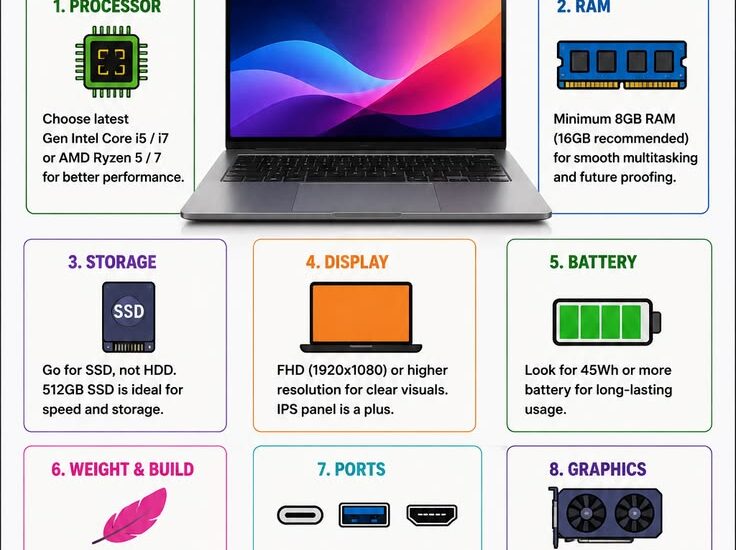
1. Check the processor
The processor affects how well the laptop handles everyday tasks.
Look for the processor generation and model, not just the name “Core i5” or “Core i7.”
For example, a newer Core i5 can perform better than an older Core i7.
Tip: Ask the seller for the exact processor model and generation.
2. Check the RAM
RAM determines how comfortably your laptop can handle multiple programs at once.
For basic tasks like browsing, Microsoft Word and school work, 8GB RAM is a good starting point.
If you plan to do heavier work such as graphics, programming, video editing or running several applications, you may want more.
3. Check the storage
If possible, go for an SSD rather than an old mechanical HDD.
An SSD can make a noticeable difference in how quickly Windows starts and how fast applications open.
Before buying, check:
- Storage capacity
- SSD or HDD
- Drive health
4. Test the battery
Don’t assume the battery is good just because the laptop turns on.
Unplug the charger and use the laptop for a while. Check how quickly the battery percentage drops.
A weak battery isn’t necessarily a deal-breaker, but you should know about it before paying.
5. Check the screen
Look carefully at the display.
Check for:
- Dead pixels
- Lines on the screen
- Flickering
- Dark spots
- Very low brightness
- Screen damage
Open a white background and a dark background if possible. Some display problems are easier to notice that way.
6. Test the keyboard and touchpad
Don’t wait until you get home before discovering that some keys don’t work.
Open Notepad and test as many keys as possible.
Also test:
- Touchpad
- Left/right click
- Function keys
- Backlight, if available
7. Test the ports
Plug something into the laptop.
Check the:
- USB ports
- HDMI
- Audio jack
- SD card slot, if available
- Charging port
A laptop can look perfect while having damaged ports.
8. Check the webcam, microphone and speakers
These are easy to overlook.
Open the camera and test it. Play a video and listen to the speakers. Test the microphone as well.
If you need the laptop for Zoom, Google Meet, online classes or content creation, these features matter.
9. Check the physical condition
A few scratches aren’t necessarily a problem.
But pay attention to serious signs of damage:
- Cracked body
- Loose hinges
- Missing screws
- Swollen battery
- Broken charging port
- Signs of liquid damage
Pay special attention to the hinges. A laptop with damaged hinges can become an expensive repair.
10. Check the laptop before making payment
This is probably the most important advice.
Don’t rush because the seller says:
“Someone else is coming for it.”
Take a few minutes to properly test the machine.
Check the specifications, battery, storage, keyboard, screen, ports, Wi-Fi, sound and general performance.
If you don’t know how to check these things yourself, take someone who does.
One more thing: don’t buy based on price alone
A ₦200,000 laptop isn’t automatically a better deal than a ₦150,000 laptop.
The real question is:
What am I getting for the money?
A slightly more expensive laptop with a newer processor, SSD, better battery and cleaner condition may save you money in the long run.
Buying a used laptop?
At SmartWeb Café, we can help you check the specifications and condition of a laptop before you buy.
And if you’re looking for a laptop, tell us your budget and what you want to use it for. We’ll help you know what to look for.
